Welcome


Welcome to the Store Visualizer quickstart guide. This short tutorial will help you to rapidly familiarize yourself with the basic work flow of the application.

For more indepth information about the features of the software, please consult the product manual which is also available through the Store Visualizer help system. Simply click the product manual button on the welcome screen or hit F1 anytime when working on a project. Should you experience any problems or have questions about the usage of the software, then please visit the Support section.

We hope you enjoy using Store Visualizer!


Step 1: Working from a 3D virtual environment


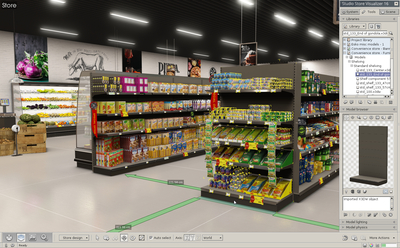
A virtual 3D environment gives you complete control over the design and the layout of your 3D virtual retail space. Using the store and shelf editing features of Store Visualizer, you can easily add shelving, create aisles, fill them with products and customize the look of your store in real time.

A project based on a virtual 3D environment allows full freedom of movement and interaction of both camera and 3D models within the simulated area.

Click on Virtual 3D environments to get more details about this kind of environment.


© Copyright 2025 VTales graphics - All rights reserved.